0 clicks
No sign-in
Open the editor and start. No login, no email, no trial, no subscription.
Free · no account · runs locally in your browser
The free FPV racetrack editor: place gates, shape the ideal line, take a test flight in the built-in simulator, and hand the finished race track to the whole crew as a QR code.
The real app
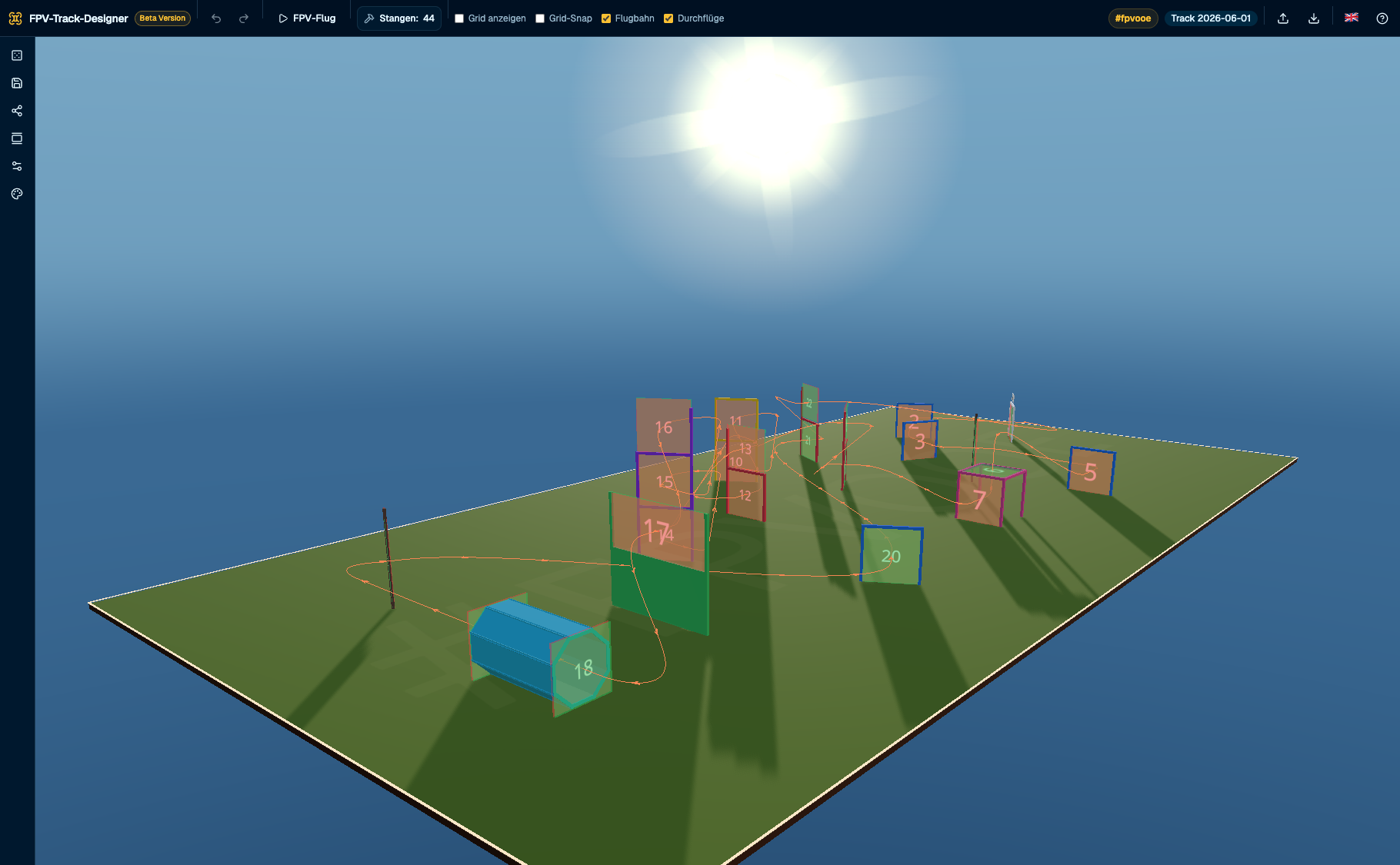
A screenshot from the editor: gates in the scene, ideal line with direction arrows, pole counter in the top bar and a track that took minutes to build.
The kit
Every gate in the editor has its own geometry, pass rule and pole count. Here they all are — drawn to scale from the 3D scene, not placeholder rectangles.
Two posts, one crossbar — the basis of almost every layout.
3 poles
Standard frame with a "Start" panel on the crossbar.
3 poles
Lower gate with a tall backrest on one side — like a small h.
4 poles
Standard and H gate stacked: fly below, through the middle, above.
7 poles
Double-width, low hurdle — you fly freely over it.
no poles
Cube frame, open at the bottom: enter from above, exit to the side.
no poles
Two standard frames stacked.
6 poles
Three frames stacked like a ladder.
9 poles
2 m mast with a flag plate — a pass counts on the marked side.
2 poles
1.2 m mast with a smaller plate.
1 poles
Octagonal tunnel, two metres deep, exit mirrored.
no poles
How it works
No CAD, no spreadsheets, no plug-ins. The editor is built around the way you work at the field: set the basics, push things around in 3D, fly right away.
All steps in the manualPick field size, venue preset, and gate count per type. Or hit Shuffle and build on a ready-made suggestion. The generator keeps at least 3 m between gates and aligns them in 30° steps.
Grab a gate and drag it, hold Shift to rotate sideways, hold Ctrl to raise it. Entry and exit side, pass-through number, deactivate an opening: all directly in the scene, no forms.
Use the autopilot to check the course, fly it yourself on your own radio, then put the QR code up at the race. Anyone who shows up scans it and is instantly in.
Ideal line & autopilot
There is no straight connection between gates. There is a flyable ideal line of straights and wide arcs, at least 0.3 m radius and up to 2 m where there is room. You shape it with waypoints; the autopilot flies it on the same flight model as the drones.
You can toggle flight path, pass-throughs, and drones individually in the top bar.
Sharing
Put the code up at the race. Anyone arriving scans it with their phone and has the course in their browser right away. No app install, no account.
Long link
There immediately and always usable, even if the short link service does not respond.
Short link
Compact for chat, registration, and the notice at the entrance.
QR code
As PNG or SVG for printing, generated in seconds.

Scan. Fly.
app.fpvtrackeditor.com
Built-in simulator
The course is ready, and now you want to fly it. The editor becomes a simulator: connect a radio or use the keyboard, arm, go. The same flight model the autopilot uses.
Local. Private. Portable.
No account, no upload, no cloud. Once loaded, everything runs locally. Your tracks live in your browser, not on someone else’s server.
Open the editor and start. No login, no email, no trial, no subscription.
Load it once and the editor keeps working without a connection. Handy in a hall with bad reception.
Export the gallery, course configuration, venue, pole limit, language, and all flight settings as one file, then import it in the next browser.
A free tool from FPVOOE for the FPV racing scene. No price, no watermarks, no ads.
Everything included
The complete toolkit for race directors, indoor builders, and pilots, in one browser app.
The whole track in one scene: orbit, zoom, edit gates right on the object.
Standard, start/finish, h-gate, double-h, hurdle, dive, double, ladder, flag, small flag, tunnel.
One click or S turns field size and gate count into a fresh course suggestion.
Straights and wide arcs instead of corners, freely shaped with waypoints.
A camera flight on the drone flight model: check the track before anyone flies.
Built-in simulator with an RC radio or keyboard, including timing.
Four tinywhoops fly the ideal line nonstop as a living preview.
Long link, short link, and QR code as PNG or SVG.
Share without edit rights: look around, fly, load JSON, open in the editor.
Save locally, duplicate, export, and import again.
Minimal, Realistic, and Night. The theme travels with the share link.
Material needed per gate type, including your own limit and a warning.
Documentation
19 chapters from first steps to troubleshooting: every setting, every key, every limit. Available in German and English, linkable and searchable.
Open documentationFAQ
What the FPV Racetrack Editor does, what it costs, and how to get your first track in five minutes — the questions that come up before every first race.
The FPV Racetrack Editor is a free 3D editor for FPV race tracks. Place gates, shape the ideal line, fly the course in the built-in simulator, and share it as a QR code — entirely in your browser, with nothing to install.
First steps in the docsNo. Open the editor and start: no login, no email, no app. After the first load it even keeps working without a connection.
See the quick startNothing. It is a free community project by FPVOOE — no subscription, no watermark, no ads. Your tracks stay with you too: no upload, no server.
Limits and requirementsEleven types built to real geometry: standard, start/finish, h-gate, double-h, hurdle, dive, double, ladder, flag, small flag, and an octagonal tunnel. The pole counter adds up the material you need.
Every gate type in detailYes. A USB radio is detected on the first stick movement and mapped in four steps, with deadband, inversion, and throttle calibration. ACRO, ANGLE, and Betaflight rates are included.
Set up flying yourselfWith a long link, a short link, or a QR code. Download the code as PNG or SVG and put it up at the race: anyone who scans it has the course in the read-only viewer right away.
Sharing and the viewerFrom an indoor round to an outdoor field: field size and venue presets are adjustable, and the default is 30 × 15 metres. The generator keeps at least 3 metres between gates.
Settings and field presetsYes, in your browser local storage. You can export the gallery, course configuration, and flight settings as one file and import it again in another browser.
Saving and backupIt needs a track that stands in five minutes, and a QR code anyone can scan.
app.fpvtrackeditor.com · runs locally · no signup